Client Center SMS opt-in
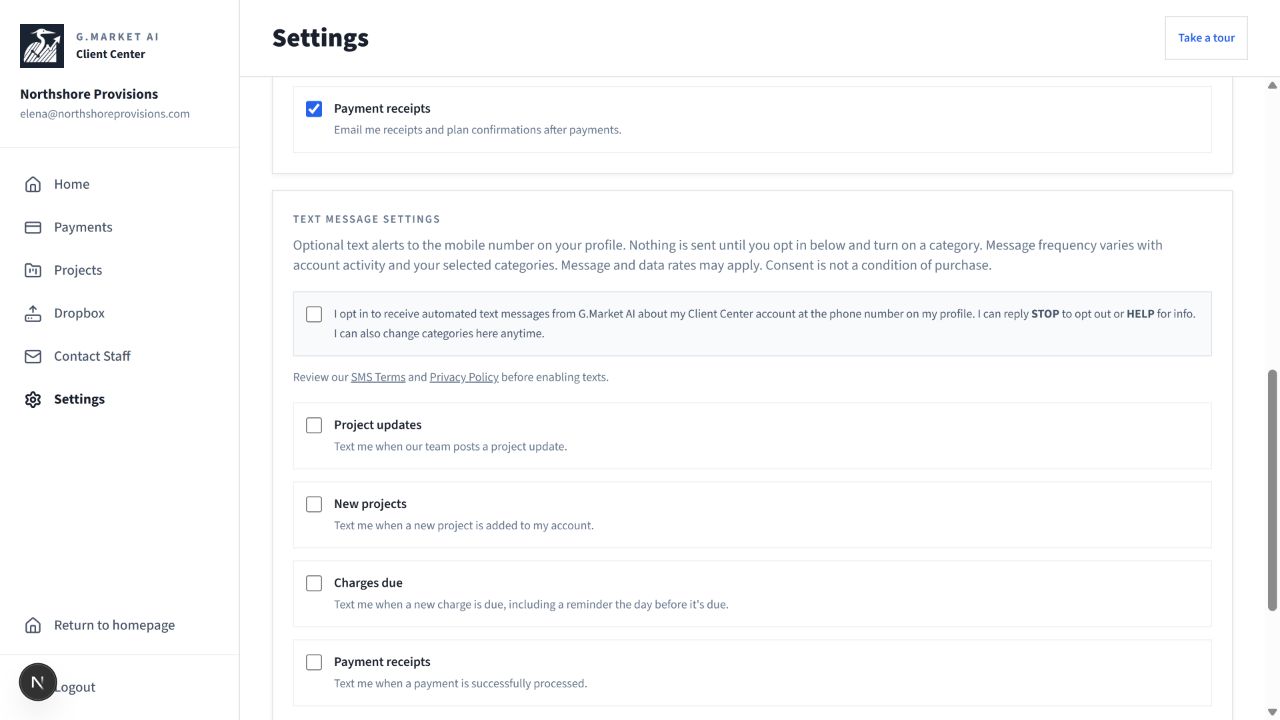
Existing clients subscribe through the authenticated Client Center Settings screen. Staff add the client’s mobile number to their profile. Adding a number does not grant SMS consent. The client must actively select the consent checkbox and enable at least one category; all categories are off by default. The service records the consent timestamp and preferences.
Messages cover project updates, new projects, invoice charges and due-date reminders, and payment receipts. Frequency varies with account activity. Reply STOP to unsubscribe or HELP for assistance. Message and data rates may apply. Consent is not a condition of purchase.
The screenshot below shows the actual Settings consent interface using demonstration account data. This public page documents the workflow; it does not subscribe visitors.